$ ls /dev/input/
by-id    event1   event12  event2  event5  event8  mice    mouse2
by-path  event10  event13  event3  event6  event9  mouse0
event0   event11  event14  event4  event7  js0     mouse1

js0 is my joystick's port.

2. Make sure my joystick is working

$ sudo jstest /dev/input/js0

I see the data parameters changing.

3. List the permissions of the joystick

$ ls -l /dev/input/js0

crw-rw-r--+ 1 root root 13, 0 2010-10-12 20:07 /dev/input/js0

This indicates I need to change the mode of the port through:

$ sudo chmod a+rw /dev/input/js0

Listing the permissions again will show this result:

crw-rw-rw-+ 1 root root 13, 0 2010-10-12 20:07 /dev/input/js0

4. Start the joy node

$ rosrun joy joy_node

5. Echo the joy topic

$ rostopic echo joy

And I see the data of my joystick is being published through the joy topic.
martes, 12 de octubre de 2010
Configuration of the Joystick
1. Verify that Linux recognizes my joystick

miércoles, 22 de septiembre de 2010
Comments on ROS Time
"ROS has builtin time and duration primitive types, which roslib provides as the ros::Time and ros::Duration classes, respectively. A Time is a specific moment (e.g. "today at 5pm") whereas a Duration is a period of time (e.g. "5 hours"). Durations can be negative."
The function Time::now(), which is used in most of the codes I am working with uses the system time:
Time Time::now()
{
if (!use_system_time_)
{
boost::mutex::scoped_lock lock(g_sim_time_mutex);
Time t = sim_time_;
return t;
}
Time t;
getWallTime(t.sec, t.nsec);
return t;
}
When I create the map in "real time" the time used is the one from my computer:
"When running with a real robot, the ROS client libraries will use "wall-clock" time (i.e. the time your computer reports). "
In the case of the playback of the bag files I have noticed the following:
"if you are playing back sensor data into your system, you may wish to have your time correspond to the timestamps of the sensor data. "
Concerning Clock server:
"If you are playing back a bag file with rosbag play, using the --clock option will run a Clock Server while the bag file is being played."
The function Time::now(), which is used in most of the codes I am working with uses the system time:
Time Time::now()
{
if (!use_system_time_)
{
boost::mutex::scoped_lock lock(g_sim_time_mutex);
Time t = sim_time_;
return t;
}
Time t;
getWallTime(t.sec, t.nsec);
return t;
}
When I create the map in "real time" the time used is the one from my computer:
"When running with a real robot, the ROS client libraries will use "wall-clock" time (i.e. the time your computer reports). "
In the case of the playback of the bag files I have noticed the following:
"if you are playing back sensor data into your system, you may wish to have your time correspond to the timestamps of the sensor data. "
Concerning Clock server:
"If you are playing back a bag file with rosbag play, using the --clock option will run a Clock Server while the bag file is being played."
Map overlapping
After modifying the launch file Renato shared with me, gmapping was no longer displaying neither the TF_OLD_DATA error, nor the dropped messages warnings. However, the map is still overlaping. Here is the content of the launch file I am currently using named launch_rovers.launch. The attempts to change nodes are presented as comments:

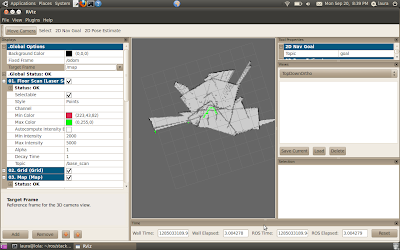
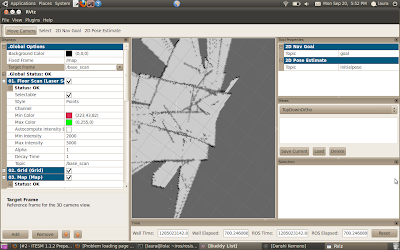
I have been playing with the fixed and the target frames as can be appreciated in the screenshots. I, however, get the same result always: overlapping of the map.
I have noticed that during this process the mobile frame isn't able to fully rotate when it is necessary and this is what I think is causing the overlapping.
I have several suppositions for the generator of this problem:
1. Odometry isn't being correctly actualized.
2. Gmapping has an error (which I have no idea about).
3. The time ins ROS isn't properly actualized nor the buffer is properly being cleaned out when necessary.
I hope the question I placed at the mailing list is soon answered.


I have been playing with the fixed and the target frames as can be appreciated in the screenshots. I, however, get the same result always: overlapping of the map.
I have noticed that during this process the mobile frame isn't able to fully rotate when it is necessary and this is what I think is causing the overlapping.
I have several suppositions for the generator of this problem:
1. Odometry isn't being correctly actualized.
2. Gmapping has an error (which I have no idea about).
3. The time ins ROS isn't properly actualized nor the buffer is properly being cleaned out when necessary.
I hope the question I placed at the mailing list is soon answered.
sábado, 28 de agosto de 2010
Pablo's pioneer_tf.cpp
Renato shared with me a post of a ROS user that does slam using the ROSARIA node. Here is the url where this post can be found and following the program itself can be found:
http://ros-users.122217.n3.nabble.com/Pioneer3-td1265101.html#a1288712
#include
#include
#include
void poseCallback(const nav_msgs::Odometry::ConstPtr& odomsg)
{
//TF odom=> base_link
static tf::TransformBroadcaster odom_broadcaster;
odom_broadcaster.sendTransform(
tf::StampedTransform(
tf::Transform(tf::Quaternion(odomsg->pose.pose.orientation.x,
odomsg->pose.pose.orientation.y,
odomsg->pose.pose.orientation.z,
odomsg->pose.pose.orientation.w),
tf::Vector3(odomsg->pose.pose.position.x/1000.0,
odomsg->pose.pose.position.y/1000.0,
odomsg->pose.pose.position.z/1000.0)),
odomsg->header.stamp, "/odom", "/base_link"));
ROS_DEBUG("odometry frame sent");
}
int main(int argc, char** argv){
ros::init(argc, argv, "pioneer_tf_publisher");
ros::NodeHandle n;
ros::Rate r(20);
tf::TransformBroadcaster broadcaster;
//subscribe to pose info
ros::Subscriber pose_sub = n.subscribe("RosAria/pose", 1, poseCallback);
while(n.ok()){
//base_link => laser
broadcaster.sendTransform(
tf::StampedTransform(
tf::Transform(tf::Quaternion(0, 0, 0), tf::Vector3(0.13, -0.04, 0.294)),
ros::Time::now(), "/base_link", "/laser"));
ros::spinOnce();
r.sleep();
}
}
http://ros-users.122217.n3.nabble.com/Pioneer3-td1265101.html#a1288712
#include
#include
#include
void poseCallback(const nav_msgs::Odometry::ConstPtr& odomsg)
{
//TF odom=> base_link
static tf::TransformBroadcaster odom_broadcaster;
odom_broadcaster.sendTransform(
tf::StampedTransform(
tf::Transform(tf::Quaternion(odomsg->pose.pose.orientation.x,
odomsg->pose.pose.orientation.y,
odomsg->pose.pose.orientation.z,
odomsg->pose.pose.orientation.w),
tf::Vector3(odomsg->pose.pose.position.x/1000.0,
odomsg->pose.pose.position.y/1000.0,
odomsg->pose.pose.position.z/1000.0)),
odomsg->header.stamp, "/odom", "/base_link"));
ROS_DEBUG("odometry frame sent");
}
int main(int argc, char** argv){
ros::init(argc, argv, "pioneer_tf_publisher");
ros::NodeHandle n;
ros::Rate r(20);
tf::TransformBroadcaster broadcaster;
//subscribe to pose info
ros::Subscriber pose_sub = n.subscribe
while(n.ok()){
//base_link => laser
broadcaster.sendTransform(
tf::StampedTransform(
tf::Transform(tf::Quaternion(0, 0, 0), tf::Vector3(0.13, -0.04, 0.294)),
ros::Time::now(), "/base_link", "/laser"));
ros::spinOnce();
r.sleep();
}
}
miércoles, 18 de agosto de 2010
Installing p2os
Most of the useful instructions I followed come from the p2os' tutorial: http://www.ros.org/wiki/p2os/Tutorials/Getting%20Started%20with%20p2os
1. I first went to the stacks ros' directory and checked out the svn for the usc packages:
1. I first went to the stacks ros' directory and checked out the svn for the usc packages:
$ cd ~/ros/stacks/
$ svn co https://usc-ros-pkg.svn.sourceforge.net/svnroot/usc-ros-pkg/trunk/ usc-ros-pkg
2. Then I updated the stack list and compiled it$ rospack profile && rosstack profile
$ rosmake p2os --rosdep-install
3. In order to connect to the /dev/ttyUSB0 port instead of /dev/ttyS0 port (which is default)
I changed the p2os.cc code as follows:
$ roscd p2os
$ cd p2os_driver
$ cd src
$ gedit p2os.cc
And around line 64 I changed the parameter of the port:
n_private.param( "port",psos_serial_port, std::string("/dev/ttyUSB0"));
instead of
n_private.param( "port",psos_serial_port, def );
4. I then just ran the p2os node and it made the connection successfully.
Now, since I currently have no access to the joystick (but I will have it, however), I am going
to modify the teleoperation launch file to do it directly with my keyboard.
viernes, 13 de agosto de 2010
Create a map of the lab with the robot Pioneer and SICK LMS:2

Yesterday I made a map of the laboratory using data from the laser recorded into a bag file and running slam_gmapping node.
I found a very simple mistake in my tf_listener.cpp code and searching through the sscrovers svn I found the same one. It is approximately at line 20 and it concerns the transformation of the new point created.
The original file displays the following:
try{ geometry_msgs::PointStamped base_point;
listener.transformPoint("base_laser_link", laser_point, base_point);
The transformation is in fact supposed to be from base_laser_link frame to base_link frame. And that is why base_point is created, to store the same information as laser_point (of base_laser_link frame) but now in the desired frame that should be base_link. The result is the following:
try{ geometry_msgs::PointStamped base_point;
listener.transformPoint("base_link", laser_point, base_point);
I then ran all of the nodes in exactly the same way I had been doing it and this time a map.pgm and a map.yaml file were created.
The only difference in my procedure was that, exactly at the time I was going to play the bag file, I pushed the reset button on rviz. In spite of this, gmapping still displays the TF_OLD_DATA error. I have been reading about it and several users in the mailing list argue that they had dealt with this same problem, both when running gmapping and other nodes.
jueves, 12 de agosto de 2010
Comments on sscrovers_tf_conf
Based on the tf robot setup tutorials I am commenting the codes of the broadcaster and listener of this package in order to find out a solution to the recently presented problem.
tf_broadcaster.cpp
The only comment I have is related to the timestamp of ros::Time::now(). Perhaps this is the reason why tf is ignoring the desired transform
tf_listener.cpp
When creating the point for the base_scan frame (the one in the laser) it is used the following message type:
             geometry_msgs::PointStamped


       The stamped at the end of the message name means that it includes headers:                                        1. The frame_id header is assigned to the frame (base_scan) itself:                                        laser_point.header.frame_id = "base_scan";                                        2. The timestamp header is assigned to ros::Time which asks for the latest available transform.                     I think this might be a key concept for debugging the program:                                        laser_point.header.stamp = ros::Time();
The next step is to declare an object (base_point) that is going to store the same information that thelaser_point (on the base_scan frame) owns but now in the base_link frame.
             try{geometry_msgs::PointStamped base_point;

                      listener.transformPoint("base_link", laser_point, base_point);
Suscribirse a:
Entradas (Atom)